One code base, all Fitbit smartwatches
The latest version (5.0) of the Fitbit OS and its SDK has been released in September 2020. This release no longer supports Fitbit smartwatches other than the Versa 3 and Sense. Hence, by targeting development only for Fitbit OS 5.0, updates to your app won’t be available for millions of devices. In this article, we describe a solution for targeting both SDK 4.x and SDK 5.x compatible devices, from the same code base, with minimal overhead.
Alternatives
Before laying out our proposed approach, let’s look at the obvious alternatives:
- Support SDK 4.x via a separate release branch. You branch off from your current SDK 4.x main branch (let’s call it
main-sdk4) and port your code to the latest SDK. Then, later, you cherry-pick all relevant changes that go into yourmaininto yourmain-sdk4branch as well. This is the solution proposed by Fitbit. - Discontinue support for SDK 4.x entirely. You just stop publishing updates to your app for Fitbit OS 4.x devices.
In case none of the above works for you, it’s worth reading on.
Basic Assumptions
The below outlined solution works provided:
- You are developing using the Fitbit CLI tools. I.e., this means you use
npx fitbitto build your app, instead of using Fitbit Studio. - Your code has no or minimal assumptions on the structure of SVG elements. In other words, we assume you are manipulating and interacting with specific SVG elements only, e.g., either retrieved via
getElementById()orgetElementsByClassName(). - Your design uses SVG components available in both SDKs. In case you need a totally different design for SDK 5.0 (e.g., because you want to fully utilize the new swipe API), the benefits of parallel development for SDK 4.x and SDK 5.x from the same code base may be negligible, and using separate release branches may be a better choice for you.
- You are using TypeScript. We constrained the example to use TypeScript, however, you can follow the same approach when developing purely in JavasScript (you’d just use
jsconfig.jsonfiles instead).
Example Project
As an example, we’ll create an app that has a pop-up asking the user for a yes/no choice:
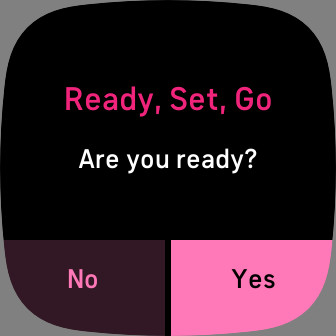
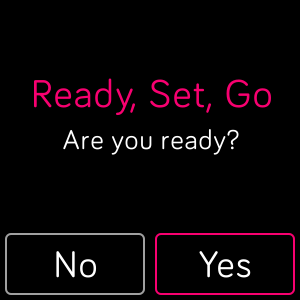
As SDK 4.x and SDK 5.x have different SVG components for implementing such pop-ups, this should demonstrate how the same code can drive both versions, while having separate SDK specific view definitions only.
Here’s the same pop-up running on SDK 4.x:
Let’s get started!
Project Structure
We’ll start with a standard layout for SDK 5.x projects:
app/
  index.ts
companion/
  index.ts
resources/
  index.view
  styles.css
  widget.defs
package.json
tsconfig.json
We’ll create a hiearchy of directories under the subdirectory sdk4 that will contain all the assets required for building for SDK 4.x:
sdk4/
  app/
  companion/
  resources/
    index.gui
    styles.css
    widgets.gui
  package.json
Note that we need everything that may be referenced from view definitions under the resources folders (for both SDK versions). Our sdk4/package.json definition should contain SDK 4.x references and build targets:
{
  "name": "dual-sdk-project",
  ...
  "devDependencies": {
    "@fitbit/sdk": "~4.1.0",
    "@fitbit/sdk-cli": "^1.7.3",
    "fitbit-sdk-types": "^4.3.9",
    ...
  },
  "fitbit": {
    ...
    "buildTargets": [
      "higgs",
      "meson",
      "gemini",
      "mira"
    ],
    ...
  },
  ...
}
Let’s make sure all the shared code is being included for compilation via the TypeScript config for the app code (example app/tsconfig.json):
{
  "extends": "../tsconfig.json",
  "include": [
    "../../app/**/*.ts",
    ...
  ]
}
Similar include needs to be added to the companion’s tsconfig.json.
As we don’t have an index.ts under app/ and companion/, the build will fail. To fix this, we need to create a symlink to the ones contained under the main source root:
$ cd sdk4
$ ln -s ../app/index.ts app/
$ ln -s ../companion/index.ts companion/
Now, the project should build from both under / and sdk4/! You can see the full working example on GitHub.
Corner Cases
Code Depends on SDK Specific Feature
If your app depends on SDK specific features, it is still possible to use the same code base for both builds. One option is to have separate factory logic for the different SDK versions (e.g., have separate app/index.ts modules that create your views), and instantiate the right implementations in these. Using tsconfig settings you can exclude the SDK 5.x specific sources when building the app for SDK 4.x.
For example, if your SDK 4.x app used panorama views, then you will need to reimplement that logic using the new swipe API in SDK 5.x.
Non-Compatible View Definitions Between SDK Versions
In case your views/view-controllers need to support two totally different layouts to get your design right, then you may want to use the above described approach as well.
Summary
In order to support development for both SDK 4.x and SDK 5.x from the same code base, the basic idea is to have two parallel base directories for each major version, and reference all shared source files via tsconfig settings.
The two parallel base directories contain
- separate dependency (
package.json) definitions (as different Fitbit SDK versions and build targets are needed), - a copy of all the required resources for the projects (as the two major SDK versions have different view, widget and CSS definitions),
- the SDK 4.x base directory contains symlinks to the
app/index.tsandcompanion/index.tsfiles from the main (SDK 5.x) source root (as these files are required for the Fitbit CLI tool to build a fitbit project).
We hope you found this guide helpful – in case you have any feedback, just let us know!
References
- tsconfig reference. You can find all the options available for configuring your TypeScript projects via
tsconfigfiles here. - Fitbit SDK 4.x guides. You can access the SDK 4.x guides that are no longer available on
dev.fitbit.comstarting from this Wayback Machine link.